Authorize your driving school

Authorize your driving school

Before Save Rijopeiding can book your test or driving exam, you have to consent to that. The possible way to do this is by authorizing your driving school. The advantage of this is that you
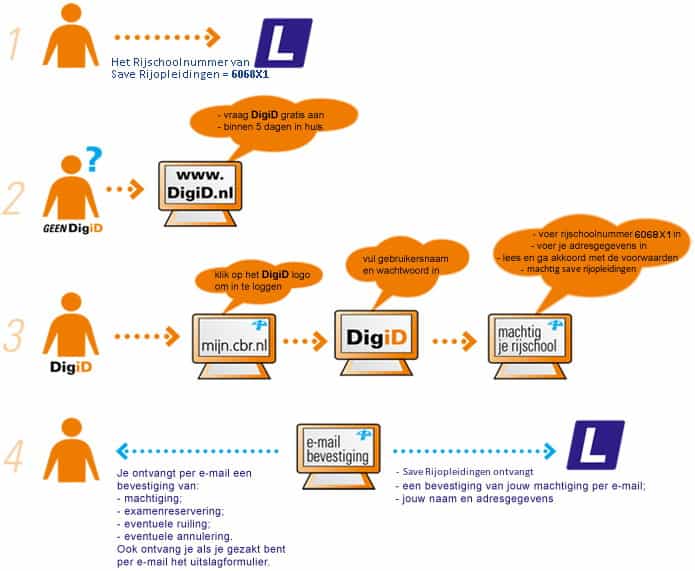
receive an e-mail as soon as Save Rijopleiding has booked a driving test or a practical test for you. You can give your driving school authorization by logging in on mijn.cbr.nl with your DigiD.
Steps to authorize your driving school

DigiD is a Dutch digital identification system for government services.

No DigiD yet? Request it for free at DigiD.nl, You will receive your personal Digid within five working days.

  • Step

    1
  • Step

    2

    Click on ‘Sign in with DigiD’ to login.

  • Step

    3

    Fill in your username and password.

  • Step

    4

    Use the drivingschoolnumber 6068X1.

  • Step

    5

    Fill in your addresss

  • Step

    6

    Read and agree to the terms and conditions.

  • Step

    7

    Authorize your driving school.

  • Done

    You will receive a confirmation immediately.